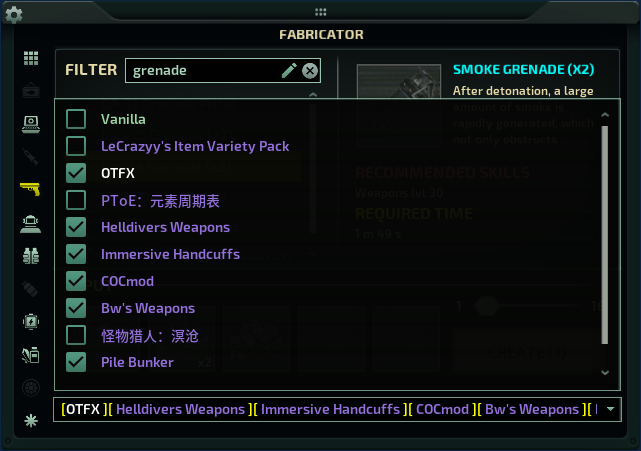
BetterFabricatorUI
介绍 | Introduction 本模组为加工台界面增加了实用的进阶筛选功能: • 按物品分类筛选(医疗、武器、潜水、装备等) — 游戏现已原生支持 • 按内容包筛选(Vanilla、BOS、EK Pack、ITA 等) • 拼音关键词搜索 — 首次启动时若检测到中文语言将自动启用 This mod enhances the fabricator UI…

 Мод для Barotrauma
от Evil Factory
Updated for the Summer Update Hotfix v1.13.5.0 Discord: Consider supporting the project: This is a Barotrauma modification that adds Lua modding, and optional CSharp modding, this…
LuaCsForBarotrauma — мод для Barotrauma (Баротравму) от автора Evil Factory. Updated for the Summer Update Hotfix v1.13.5.0 Discord: Consider supporting the project: This is a Barotrauma modification that adds Lua modding, and optional CSharp modding, this…
На него подписались 808,4 тыс. раз в Мастерской Steam: это 1-е место среди модов Barotrauma в нашем каталоге, редкость — «легендарный» (топ-5% по подпискам). Мод обновлялся в последний месяц.
Это библиотека: сама по себе ничего не добавляет, но нужна другим модам.
6 шт · нажмите, чтобы открыть
Текст автора на языке оригинала
This is a Barotrauma modification that adds Lua modding, and optional CSharp modding, this is not a direct replacement for xml, but works great in doing things that weren't possible in xml.
There are several different ways to install this mod. Choose whichever method works best for you from the options below.
Only use one installation method at a time. Do not use multiple methods simultaneously.
The mod now has a new installation method, you can install it by simply putting in a special launch option in Steam, here's how you do it:
Windows: cmd /c "C:\Windows\System32\curl.exe -L -o Luatrauma.AutoUpdater.win-x64.exe https://github.com/Luatrauma/Luatrauma.AutoUpdater/releases/download/latest/Luatrauma.AutoUpdater.win-x64.exe && start /b Luatrauma.AutoUpdater.win-x64.exe %COMMAND%"
Linux: bash -c "wget -N https://github.com/Luatrauma/Luatrauma.AutoUpdater/releases/download/latest/Luatrauma.AutoUpdater.linux-x64 && chmod +x Luatrauma.AutoUpdater.linux-x64 && ./Luatrauma.AutoUpdater.linux-x64 %command%"
MacOS: /bin/zsh -c "cd Barotrauma.app/Contents/MacOS && /usr/bin/curl -LOR https://github.com/Luatrauma/Luatrauma.AutoUpdater/releases/download/latest/Luatrauma.AutoUpdater.osx-x64 && chmod +x Luatrauma.AutoUpdater.osx-x64 && ./Luatrauma.AutoUpdater.osx-x64 %command%/Contents/MacOS/Barotrauma"
This installation method will download the mod and install automatically both client-side and server-side from GitHub every time you launch the game. This means the mod installation will always be preserved even if you verify the game files or a new Barotrauma update is released. You can of course uninstall the mod by deleting the launch option and verifying the game files.
This is the classic way of installing the mod, it makes use of the content package, so make sure to have this mod subscribed and updated in the workshop.
Note: Linux and MacOS are not supported by this installation method.
Every time you host, make sure to enable the LuaCsForBarotrauma package and select the LuaCsForBarotrauma server executable in the hosting menu:
Note that this will only run LuaCsForBarotrauma server-side, to also have the mod installed client-side, do the following instructions:
install_cl_lua
(Video if you don't understand the instructions above: https://www.youtube.com/watch?v=wEeJ70vH1TM )
The client-side installation will be reverted every time you verify the game files or a new Barotrauma update is released, so you will need to do this process again if that happens.
This installation method requires you to manually download the mod as a ZIP file from GitHub and extract it into your game directory. Follow the guide below for detailed instructions:
https://evilfactory.github.io/LuaCsForBarotrauma/lua-docs/manual/installing-lua-for-barotrauma-manually
Note: If you are installing this mod on a dedicated server, this is the recommended installation method.
You can test if client-side is working properly by opening the debug console (F3) and typing in cl_reloadluacs, if you see a message saying command not found, then the mod is not installed on the client. To test if server-side is working, first host a server, then open the debug console (F3) and type in reloadluacs, again if you see a message saying command not found, then the mod is not installed on the server.
If you are having problems with the mod, always try doing these things before seeking for help:
Nothing worked? Feel free to seek for help, but please always try to provide as much information as possible, it's hard to solve a problem without much information.
Perfidious Leaf - Fully reworked and improved the C# loading mechanism peelz - Contributed a lot to the project, from fully reworking the hook system to fixing a bunch of bugs on the moonsharp repo. oiltanker - Contributed the initial CSharp mod loader. zhurengong - Provided lots of useful feedback for the mod on the early days and helped with the making of the CSharp loader.
Special thanks to all sponsors that kept and keep the project going: Taj the King FearTheQueer Ricky Rolf Lewis Perfidious Leaf Hadrada WjunniorW dnova Amadare Esirprus The Great Coachwhip **Everg
Описание длинное — здесь его начало. Читать целиком на странице автора
Мод ставится подпиской в Мастерской Steam — без архивов, перезаливов и сторонних установщиков
Подробная инструкция для BarotraumaВставьте значок в описание на Мастерская Steam, в README или в Discord — русскоязычные игроки сразу попадут на страницу с переводом и инструкцией.

[](https://modka.app/barotrauma/luacsforbarotrauma/)<a href="https://modka.app/barotrauma/luacsforbarotrauma/"><img src="https://modka.app/badge.png" alt="Описание на русском — Модка" height="44"></a>[url=https://modka.app/barotrauma/luacsforbarotrauma/]Описание на русском — Модка[/url]Откройте страницу мода «LuaCsForBarotrauma» в Мастерской Steam (кнопка «Скачать» на нашем сайте ведёт именно туда) и нажмите «Подписаться» — Steam сам скачает мод и будет его обновлять. Если Steam покажет список обязательных модов, подпишитесь и на них — без них мод не заработает. Запустите Barotrauma, откройте «Настройки» → «Моды» и включите мод в списке. Если мод не появился в игре, откройте вкладку «Загрузки» в Steam и дождитесь, пока он скачается полностью, затем перезапустите игру. Для игры по сети подпишитесь на одни и те же моды всей компанией: набор модов у хоста и у игроков, как правило, должен совпадать.
Мы ничего не перезаливаем: кнопка скачивания открывает официальную страницу мода в Мастерской Steam. Там нужно нажать «Подписаться» — файлы загрузит и будет обновлять сам Steam.
В сетевой игре Barotrauma набор модов у хоста и у остальных игроков, как правило, должен совпадать: подпишитесь на одни и те же моды всей компанией. Исключения — моды, которые меняют только то, что видите и слышите вы сами; точные требования автор пишет в описании мода.
27 октября 2026. Дата берётся с официальной страницы мода при каждом обновлении каталога.
介绍 | Introduction 本模组为加工台界面增加了实用的进阶筛选功能: • 按物品分类筛选(医疗、武器、潜水、装备等) — 游戏现已原生支持 • 按内容包筛选(Vanilla、BOS、EK Pack、ITA 等) • 拼音关键词搜索 — 首次启动时若检测到中文语言将自动启用 This mod enhances the fabricator UI…
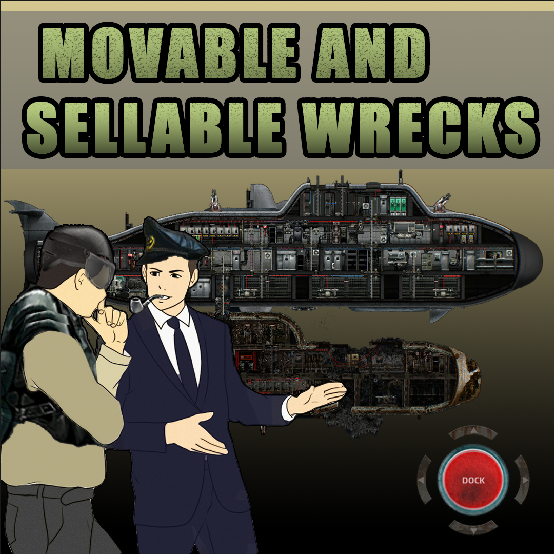
Movable and Sellable Wrecks This mod introduces the capability to move and sell wrecks from any mod, including the base game. It also provides a heavy industrial hook for lifting…

Sellable Pirate Vessels Transform pirate vessels into marks and xp, just like in Movable and Sellable Wrecks. Client-Side Lua is required for singleplayer functionality. For…
Version 1.21 This client-side mod aims to rewrite every affliction and item description in Neurotrauma to be more informational in terms of causes, uses, and effects. Symptoms…
ATTENTION Please read the description as it contains important information about features, patches and incompatibilities! Requires a new campaign after first installation! DO NOT…
Note: This mod is already quite old, a lot of the performance issues in the base game have been addressed, so the performance improvements you get with this mod probably wont be…