UIExtenderEx
Для ранней версии, пожалуйста, посетите это! Для версии v1.0.0-v1.2.12, пожалуйста, посетите эту страницу! Источники доступны на GitHub! установка Этот модуль должен быть одним из..

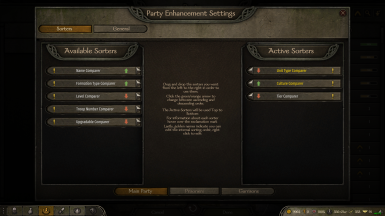
 Мод для Mount & Blade II: Bannerlord
от Syntax555
Отказ от ответственности Я не сделал этот мод, Хиртол сделал его. Но, как он заявил, у каждого есть разрешение на загрузку своего мода. Пока он не загружает этот мод в Steam Workshop, я..
Party Screen Enhancements — мод для Mount & Blade II: Bannerlord (Баннерлорд) от автора Syntax555. Отказ от ответственности Я не сделал этот мод, Хиртол сделал его. Но, как он заявил, у каждого есть разрешение на загрузку своего мода. Пока он не загружает этот мод в Steam Workshop, я..
На него подписались 60,5 тыс. раз в Мастерской Steam: это 127-е место среди модов Mount & Blade II: Bannerlord в нашем каталоге, редкость — «редкий» (топ-50% по подпискам). Мод давно не обновлялся — проверьте совместимость с текущей версией игры.
Нужны ли ему другие моды, видно на его странице в Мастерской Steam в блоке «Необходимые продукты» — при подписке Steam сам предложит их добавить.
Текст автора на языке оригинала
I did not make this mod, Hirtol made it. But as stated by him, everyone has the permission to upload his mod. As long as he doesn’t upload this mod on Steam Workshop, I will do it. If he considers uploading it himself, I will delete this mod. Please consider supporting Hirtol on Nexus.
Party Screen Enhancements on Nexus by Hirtol Hirtol’s Profile on Nexus Source on Github
Adds an Upgrade All, Sort all, and a Recruit All Prisoners button to the party interface. Includes a user friendly UI for configuration.
The mod adds an Upgrade All button, Sort all button, and a Recruit All Prisoners button to the top right of the party screen. In addition, it adds a variety of configuration options in a user friendly UI to allow customization.
The Upgrade All button will by default only upgrade units with 1 potential upgrade path, from top to bottom on the party list. In order to also upgrade units with multiple upgrade paths, you can CTRL + SHIFT + Left click on an upgrade option to select it. Click it again to deselect.
So, for example, if you have an Imperial Recruit and wish all recruits get upgraded to Imperial Archers, you CTRL + SHIFT + Left Click on the button you would usually use to upgrade them manually. A message will inform you that the upgrade path has been set.
Thereafter, if you click upgrade all the units with either 1 path, or a path manually selected, will be upgraded if possible.
Alternatively, you can enable the 50/50 recruitment option to recruit equally from both paths.
If you wish to stop a certain one path unit from upgrading, you can simply CTRL + SHIFT + Left click on its upgrade button to disable the auto upgrade for that unit.
The prisoner recruitment will by default recruit prisoners top to bottom in your prisoner list if they can be recruited at that point. It will stop once you reach your party limit. The party limit can be ignored by CTRL clicking the Recruit All button. If you wish to stop a certain prisoner type from being recruited simply CTRL + SHIFT + Left click on their recruit button when it is enabled to disable recruitment.
If you wish to change the default sort order, click on the Settings button on the Party screen. In this menu you can order the sorters and change whether they sort ascendingly or descendingly. You can drag and drop them. The sorters will be used top to bottom, the lower layer being used whenever the layer above it had two units which were equal.
So, if you have a tier sorter, followed by a name sorter, the function will first evaluate the tier. If both units have the same tier, their name will be used instead, etc.
To close the menu, simply press Escape or click the Red button on the top right.
There is a config located in your Documents/Mount and Blade II Bannerlord/Configs/Mods/ PartyScreenEnhancements.xml is used for saving your selected upgrade paths, sorters, and other selected preferences. All of the settings saved there can be changed in-game using the settings interface.
It should have no lasting effect on your save file, so you can remove it mid-game.
Мод ставится подпиской в Мастерской Steam — без архивов, перезаливов и сторонних установщиков
Подробная инструкция для Mount & Blade II: BannerlordВставьте значок в описание на Мастерская Steam, в README или в Discord — русскоязычные игроки сразу попадут на страницу с переводом и инструкцией.

[](https://modka.app/bannerlord/party-screen-enhancements/)<a href="https://modka.app/bannerlord/party-screen-enhancements/"><img src="https://modka.app/badge.png" alt="Описание на русском — Модка" height="44"></a>[url=https://modka.app/bannerlord/party-screen-enhancements/]Описание на русском — Модка[/url]Откройте страницу мода «Party Screen Enhancements» в Мастерской Steam (кнопка «Скачать» на нашем сайте ведёт именно туда) и нажмите «Подписаться» — Steam сам скачает мод и будет его обновлять. Если Steam покажет список обязательных модов, подпишитесь и на них — без них мод не заработает. Запустите игру: в лаунчере Bannerlord откройте вкладку «Моды» (Mods), отметьте мод галочкой и расставьте порядок загрузки, затем нажмите «Играть». Если мод не появился в игре, откройте вкладку «Загрузки» в Steam и дождитесь, пока он скачается полностью, затем перезапустите игру. Чтобы убрать мод, нажмите «Отписаться» на его странице в Мастерской — Steam удалит его файлы сам.
Мы ничего не перезаливаем: кнопка скачивания открывает официальную страницу мода в Мастерской Steam. Там нужно нажать «Подписаться» — файлы загрузит и будет обновлять сам Steam.
17 ноября 2022. Это больше года назад: перед установкой проверьте, работает ли мод на текущей версии игры.
Для ранней версии, пожалуйста, посетите это! Для версии v1.0.0-v1.2.12, пожалуйста, посетите эту страницу! Источники доступны на GitHub! установка Этот модуль должен быть одним из..

Оригинальное название: MBOptionScreen Standalone Ранее была разветвлена вилка ModLib. Источники доступны на GitHub! Кредиты Дрогеану для MCM Logos! MCM — это экран с модными опциями

Улучшенные гарнизоны - это мод Mount & Blade Bannerlord, который направлен на улучшение управления вашими замками и поселениями. С этим модом улучшенный гарнизон будет добавлен к каждому..
Постройте свой собственный город (ы), замок (ы), деревню (ы). Игровое поселение (ы) добавляет функции для строительства собственных городов, деревень и замков, когда определенные (настраиваемые) требования
Легкий мод, который пропускает загрузку сцены арены, а также назойливый разговор с Мастером турнира каждый раз, когда вы ищете новый турнир. Нагрузка..
Удаляет механику Тумана войны, добавленную в 1,1.0 к Энциклопедии. Теперь, опять же, вы можете знать детали каждого Героя и каждого Поселения, не посещая их. Этот мод является..