
RHSUSAF
# RELEASE 0.5.6: RHS: United States Armed Forces changelog available here - # DISCLAIMER & LICENSE # RE-UPLOADS Re-uploads of any RHS content (in part or in full) on Steam…


 Мод для Arma 3
от duda
SP & MP Compatible. Full replacement for in-game sling loading. Completely optional, but if you want to give back for any of my addons, I would greatly appreciate Donations! Want…
Advanced Sling Loading — мод для Arma 3 (Арму 3) от автора duda. SP & MP Compatible. Full replacement for in-game sling loading. Completely optional, but if you want to give back for any of my addons, I would greatly appreciate Donations! Want…
На него подписались 818,8 тыс. раз в Мастерской Steam: это 28-е место среди модов Arma 3 в нашем каталоге, редкость — «эпический» (топ-20% по подпискам). Мод давно не обновлялся — проверьте совместимость с текущей версией игры.
Нужны ли ему другие моды, видно на его странице в Мастерской Steam в блоке «Необходимые продукты» — при подписке Steam сам предложит их добавить.
Текст автора на языке оригинала
SP & MP Compatible. Full replacement for in-game sling loading.
Completely optional, but if you want to give back for any of my addons, I would greatly appreciate Donations!
Also check out my Advanced Towing and Advanced Rappelling addons for more rope features!
You can customize which classes of objects can "deploy" cargo ropes by overriding the ASL_SUPPORTED_VEHICLES_OVERRIDE variable in an init.sqf file.
ASL_SUPPORTED_VEHICLES_OVERRIDE = [ "Air" ];
This will only allow objects of class Air deploy cargo ropes.
You can customize what can and can't be sling loaded by defining the ASL_SLING_RULES_OVERRIDE variable in the init.sqf file.
ASL_SLING_RULES_OVERRIDE = [ ["Air", "CAN_SLING", "Ship"], ["Air", "CANT_SLING", "Air"] ];
In this example, all objects of class Air can sling load Ships but not Air.
You can allow sling loading of locked vehicles by defining ASL_LOCKED_VEHICLES_ENABLED in your init.sqf file. It defaults to false.
ASL_LOCKED_VEHICLES_ENABLED = true;
You can allow sling loading in an Exile safe zone by defining ASL_EXILE_SAFEZONE_ENABLED in your init.sqf file. It default to false.
ASL_EXILE_SAFEZONE_ENABLED = true;
Not working on your server?
Make sure you have the mod listed in the -mod or -serverMod command line option. Only -serverMod is required for this addon. If still not working, check your server log to make sure the addon is found.
This addon is only required on the server - is it going to slow down my server?
No - while this addon is server-side only, it installs itself on all clients without them downloading the addon. Most of the time, the towing code actually runs client-side, even though you installed the addon only on the server. Magic!
Battleye kicks me when I try to do xyz. What do I do?
You need to configure Battleye rules on your server. Below are the files you need to configure:
setvariable.txt
Add the following exclusions to the end of all lines starting with 4, 5, 6, or 7 if they contain "" (meaning applies to all values):
!="ASL_Ropes" !="ASL_Ropes_Vehicle" !="ASL_Ropes_Pick_Up_Helper" !="ASL_Cargo"
setvariableval.txt
If you have any lines starting with 4, 5, 6, or 7 and they contain "" (meaning applies to all values) it's not going to work. Either remove the line or explicitly define the values you want to kick. Since the values of the variables above can vary, I don't know of a good way to define an exclusion rule.
Also, it's possible there are other battleye filter files that can cause issues. If you check your battleye logs you can figure out which file is causing a problem.
The sling actions appear when looking at a vehicle, but do nothing when I select them. How do I fix that?
Most likely your server is setup with a white list for remote executions. In order to fix this, you need to modify your mission's description.ext file, adding the following CfgRemoteExec rules. If using InfiStar you should edit your cfgremoteexec.hpp instead of the description.ext file. See https://community.bistudio.com/wiki/Arma_3_Remote_Execution for more details on CfgRemoteExec.
class CfgRemoteExec { class Functions { class ASL_Pickup_Ropes { allowedTargets=0; }; class ASL_Deploy_Ropes_Index { allowedTargets=0; }; class ASL_Rope_Set_Mass { allowedTargets=0; }; class ASL_Extend_Ropes { allowedTargets=0; }; class ASL_Shorten_Ropes { allowedTargets=0; }; class ASL_Release_Cargo { allowedTargets=0; }; class ASL_Retract_Ropes { allowedTargets=0; }; class ASL_Deploy_Ropes { allowedTargets=0; }; class ASL_Attach_Ropes { allowedTargets=0; }; class ASL_Drop_Ropes { allowedTargets=0; }; class ASL_Hint { allowedTargets=1; }; class ASL_Hide_Object_Global { allowedTargets=2; }; }; };
https://github.com/sethduda/AdvancedSlingLoading/issues
If anyone wants to help fix any of these, please let me know. You can fork the repo and create a pull request.
Got Questions? Join my Discord channel: https://discord.gg/RHkGYCt
Мод ставится подпиской в Мастерской Steam — без архивов, перезаливов и сторонних установщиков
Подробная инструкция для Arma 3Вставьте значок в описание на Мастерская Steam, в README или в Discord — русскоязычные игроки сразу попадут на страницу с переводом и инструкцией.

[](https://modka.app/arma-3/advanced-sling-loading/)<a href="https://modka.app/arma-3/advanced-sling-loading/"><img src="https://modka.app/badge.png" alt="Описание на русском — Модка" height="44"></a>[url=https://modka.app/arma-3/advanced-sling-loading/]Описание на русском — Модка[/url]Откройте страницу мода «Advanced Sling Loading» в Мастерской Steam (кнопка «Скачать» на нашем сайте ведёт именно туда) и нажмите «Подписаться» — Steam сам скачает мод и будет его обновлять. Если Steam покажет список обязательных модов, подпишитесь и на них — без них мод не заработает. Запустите Arma 3: в лаунчере игры откройте вкладку «Моды» (Mods), отметьте мод галочкой и нажмите «Играть». Сценарии из Мастерской появляются в списке сценариев в самой игре. Если мод не появился в игре, откройте вкладку «Загрузки» в Steam и дождитесь, пока он скачается полностью, затем перезапустите игру. Для игры по сети подпишитесь на одни и те же моды всей компанией: набор модов у хоста и у игроков, как правило, должен совпадать.
Мы ничего не перезаливаем: кнопка скачивания открывает официальную страницу мода в Мастерской Steam. Там нужно нажать «Подписаться» — файлы загрузит и будет обновлять сам Steam.
В сетевой игре Arma 3 набор модов у хоста и у остальных игроков, как правило, должен совпадать: подпишитесь на одни и те же моды всей компанией. Исключения — моды, которые меняют только то, что видите и слышите вы сами; точные требования автор пишет в описании мода.
7 сентября 2016. Это больше года назад: перед установкой проверьте, работает ли мод на текущей версии игры.
# RELEASE 0.5.6: RHS: United States Armed Forces changelog available here - # DISCLAIMER & LICENSE # RE-UPLOADS Re-uploads of any RHS content (in part or in full) on Steam…

# RELEASE 0.5.6: RHS: Armed Forces of the Russian Federation changelog available here - # DISCLAIMER & LICENSE # RE-UPLOADS Re-uploads of any RHS content (in part or in full) on…

# RELEASE 0.5.6: RHS: GREen Forces changelog available here - # REQUIREMENTS RHS: GREF requires 2 mods to run * RHS: AFRF - * RHS: USAF - # DISCLAIMER & LICENSE # RE-UPLOADS…

CONTENT This is the VEHICLE pack. It contains all the vehicles from Arma 2 and the expansion and DLC's. All vehicles are ported with Arma 3 standarts and features. For credits and…

# RELEASE 0.5.6: RHS: Serbian Armed Forces changelog available here - # REQUIREMENTS RHS: SAF requires 2 mods to run * RHS: AFRF - * RHS: USAF - # DISCLAIMER & LICENSE #…
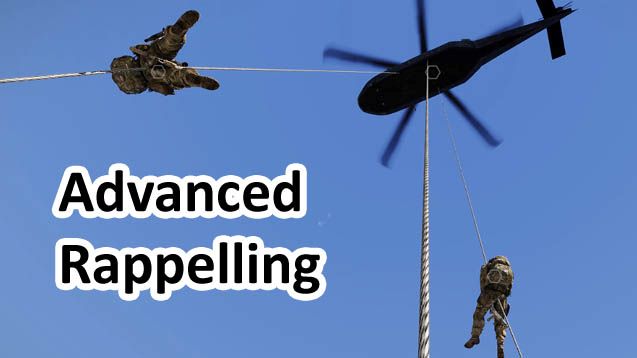
Adds support for helicopter rappelling. SP & MP Compatible. Completely optional, but if you want to give back for any of my addons, I would greatly appreciate Donations! Want…