

S-Dino Variants
Этот мод добавляет различные виды светящихся, красивых S-Dinos

 Мод для ARK: Survival Ascended
от scorchingkami
Мод, который добавляет новый вид драконов в ARK!
Dragon's Kingdom — мод для ARK: Survival Ascended (Арк) от автора scorchingkami. Мод, который добавляет новый вид драконов в ARK!
Его скачали 3,3 млн раз: это 108-е место среди модов ARK: Survival Ascended в нашем каталоге, редкость — «обычный» (нижняя половина по скачиваниям). Мод обновлялся в последний месяц, актуальная версия — dragons-kingdom-windows-133.zip.
Дополнительных модов для работы не требует.
8 шт · нажмите, чтобы открыть
Текст автора на языке оригинала
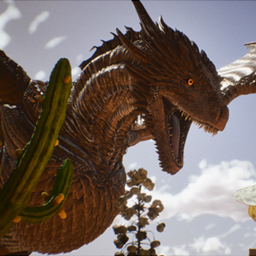
This mod unleashes a new breed of dragons onto the ARK! Take to the skies on the back of ancient beasts and conquer the world! Dragon Kingdom adds a new breed of fire-breathing lizard to the game that comes with a more dynamic flight mechanic, colorized fire and an immersive growth system. The dragon is able to glide and dive, as well as carry extra passenger depending on its size.
Spawns: Grasslands (low chance), mountains, SE mountains, Extinction city and snowy mountains. For extinction, spawns in cities where flyers do.
X [L1]: Cosmetic Roar
Other features:
In the wild, all dragons have a chance upon landing to rest. Approach the dragon when its sleeping and feed it raw mutton to initiate tame; once hungry again, it will feed only on tamed live sheep! High health sheep provide faster tame. Once reaching 50% tame, the dragon will allow the player to ride it to complete the taming. Kill large, high level wild creatures to increase your taming and Bond Strength. Once tamed, the Bond Strength will directly translate to imprint.
Furthermore, when initially fed, the dragon has a 2% chance to initiate the Chosen Mechanic. This happens only once per player, per dragon. Instead of requiring sheep, this dragon will instead bend its neck immediately to the player for a hunt-only type tame! Save the Juvenile T1 tier, all other dragons have a sliding chance of refusing to accept being tamed (0% 72% 91% 95% 97%). They will go back to sleep after refusing and not interact for about 5 minutes. You are welcome to try again!
NOTE: recommend having a levelled sheep on passive at the ready before feeding the raw mutton to the dragon! By default, the refusal chance is high outside of a Juvenile Zaldrir!
Furthermore, Zaldrirs have higher per level gain than wyverns, thus they spawn at normal dino levels and do not get post-tame levels. If you wish to change the later, check the INI section!
T0 Hatchling Zaldrir Dragon T1 Juvenile Zaldrir Dragon T2 Young Zaldrir Dragon T3 Adult Zaldrir Dragon T4 Elder Zaldrir Dragon
T5 Ancient Zaldrir Dragon
Killing a Alpha Dragon gives you a Black Tooth, which is the item used to upgrade your dragon between different sizes. Do note that Hatchlings do not grow with these, you need to level them five time for the option to grow to pop up in its action wheel under the dragon tab!
Dragon's Kingdom has ingame INI. Spawn a dragon and be in admin mode to be able to access it in the option wheel! Health, Damage, Armor and Taming options can be edited individually for each dragon size. Use SYNCH TO GAME INI SETTINGS to synchronize the in-game INI options with the available gameINI options.
[DK]
NotSleepTame: [When set to TRUE, disables sleep taming for Zaldrirs.]
IsEggTameable: [When set to TRUE, allows the old tranq egg steal taming method.]
IsAlphaTameable: [When set to TRUE, allows Alpha sleep taming.]
OverhaulMode= [By default set to FALSE. When set to TRUE, enables post tame levels for Zaldrir Dragons. Note: Zaldrir Dragons gain higher per level than even vanilla wyverns. Not recommended for vanilla balanced playthroughs.]
T1_RefusalChance: [Default value of 1, max of 100: sets the chance for a Zaldrir to refuse taming. This number is compared to a randomized 1 to 100 range. Equal or higher result to the INI results in success.] T2_RefusalChance: [Refusal chance for T2 Zaldrir]
T3_RefusalChance: [Refusal chance for T3 Zaldrir]
T4_RefusalChance: [Refusal chance for T4 Zaldrir]
T5_RefusalChance: [Refusal chance for T5 Zaldrir]
A_RefusalChance: [Refusal chance for Alpha Zaldrir]
T1_ChosenChance: [Default value of 98, allowing only 2% chance of the chosen mechanic triggering.]
T2_ChosenChance: [Chosen chance for T2 Zaldrir]
T3_ChosenChance: [Chosen chance for T3 Zaldrir]
T4_ChosenChance: [Chosen chance for T4 Zaldrir]
T5_ChosenChance: [Chosen chance for T5 Zaldrir]
TA_ChosenChance: [Chosen chance for Alpha Zaldrir]
T1DmgMult= [Global Variable, Default of 1. Multiplies the output damage of a Zaldrir.]
T1HealthMult= [Global Variable, Default of 1. Multiplies the tamed health of a Zaldrir.]
T2DmgMult= [Default of 1]
T2HealthMult= [Default of 1]
T3DmgMult= [Default of 1]
T3HealthMult= [Default of 1]
T4DmgMult= [Default of 1]
T4HealthMult= [Default of 1]
T5DmgMult= [Default of 1]
T5HealthMult= [Default of 1]
TADmgMult= [Default of 1, Alpha dmg multiplier]
TAHealthMult= [Default of 1, Alpha tamed health multiplier]
T1ZaldrirArmorRes= [Default of 0. Percentage resistance for the Zaldrir.]
T2ZaldrirArmorRes= [Default of 0.5. Percentage resistance for the Zaldrir.]
T3ZaldrirArmorRes= [Default of 0.10. Percentage resistance for the Zaldrir.]
T4ZaldrirArmorRes= [Default of 0.15. Percentage resistance for the Zaldrir.]
T5ZaldrirArmorRes= [Default of 0.20 Percentage resistance for the Zaldrir.]
TAZaldrirArmorRes= [Default of 0.25 Percentage resistance for the Zaldrir.]
Описание длинное — здесь его начало. Читать целиком на странице автора
Файл скачивается с официального сервера CurseForge, без перезаливов и сторонних установщиков
Подробная инструкция для ARK: Survival AscendedВставьте значок в описание на CurseForge, в README или в Discord — русскоязычные игроки сразу попадут на страницу с переводом и инструкцией.

[](https://modka.app/ark-survival-ascended/dragons-kingdom/)<a href="https://modka.app/ark-survival-ascended/dragons-kingdom/"><img src="https://modka.app/badge.png" alt="Описание на русском — Модка" height="44"></a>[url=https://modka.app/ark-survival-ascended/dragons-kingdom/]Описание на русском — Модка[/url]Запустите ARK: Survival Ascended и откройте в главном меню раздел «Моды». Найдите «Dragon's Kingdom» поиском и нажмите «Установить». Чтобы мод работал в одиночной игре, включите его при создании или загрузке мира. На чужих серверах ничего ставить не нужно: игра скачает моды сервера сама.
Файл скачивается с официального сервера CurseForge, куда его загрузил scorchingkami. Мы не перезаливаем и не изменяем моды.
13 ноября 2026, актуальная версия — dragons-kingdom-windows-133.zip. Дата берётся с официальной страницы мода при каждом обновлении каталога.
Этот мод добавляет различные виды светящихся, красивых S-Dinos

Добавляет кнопку в мини-карту, с помощью которой можно найти динозавра.

Случайный красочный блеск! Динозавры укрощают, охотятся, наслаждаются

Мод распределения уровней.

Представляет Moro Rex и Moro Raptor в игре для игроков.

Брахиозавр из дополнений ARK