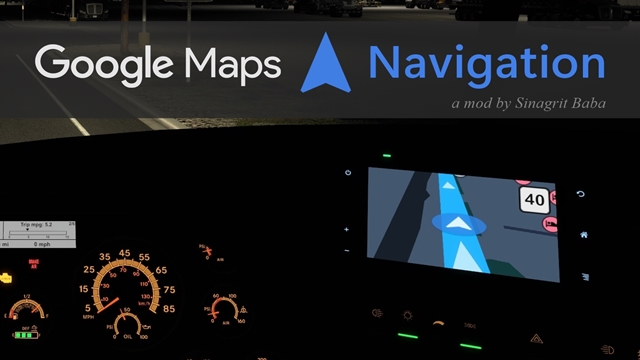
(Closed) Google Maps Navigation Night Version
What Does "Closed" Mean? First of all, thank you so much for all the interest and support you've shown this mod up until now. I’m no longer able to dedicate the time I used to for…


 Мод для American Truck Simulator
от Sinagrit Baba
What Does "Closed" Mean? First of all, thank you so much for all the interest and support you've shown this mod up until now. I’m no longer able to dedicate the time I used to for…
(Closed) Google Maps Navigation — мод для American Truck Simulator (Американ Трак Симулятор) от автора Sinagrit Baba. What Does "Closed" Mean? First of all, thank you so much for all the interest and support you've shown this mod up until now. I’m no longer able to dedicate the time I used to for…
На него подписались 258,1 тыс. раз в Мастерской Steam: это 26-е место среди модов American Truck Simulator в нашем каталоге, редкость — «эпический» (топ-20% по подпискам). Мод давно не обновлялся — проверьте совместимость с текущей версией игры.
Нужны ли ему другие моды, видно на его странице в Мастерской Steam в блоке «Необходимые продукты» — при подписке Steam сам предложит их добавить.
Текст автора на языке оригинала
First of all, thank you so much for all the interest and support you've shown this mod up until now. I’m no longer able to dedicate the time I used to for my mods, so development for this one has officially stopped.
Note: If anyone wants to update the mod and share it with the community, feel free to do so — as long as it’s also published on the Steam Workshop.
April 7, 2025
This mod simulates your in-vehicle navigation screen to Google Maps Navigation.
Colors, player arrow and map icons have been changed. The position of the speed limit has also been changed. (to the upper right corner)
Your GPS navigation screen will look more realistic now.
To use with ProMods Canada: Google Maps Navigation ProMods Canada Addon
To use with Other Map/Zoom Mods: How to Use With Map/Zoom Mods
Use night version (dark theme): Google Maps Navigation Night Version
To use with Euro Truck Simulator 2: ETS 2 - Google Maps Navigation
As you know, almost everything changed after the v2.7 major update. If you still want to use the old icons of the mod, you can download this addon: Old Icons Addon
Compatible with 1.53.x game version.
Brightness Setting
If you think it's bright/dark, you can change the backlight setting for yourself. Press F4 and change your Dashboard Backlight setting.
Discovered and Undiscovered Road Colors
I disabled the color change in navigation for realism. You should look at the world map for discovered and undiscovered roads. (or you can change the colors for yourself by editing the def/map_data.sii file.)
Auto Switch
It is not possible to use both day and night versions by activating them together. The version you give high priority in the mod manager will work. Because it is impossible to automatically change the day-night version in the game. (I'm not just talking about simply changing the background color. The icons and all other colors(road, prefab, grass etc.) of the Day and Night versions are completely different. And it's not possible to change all of this automatically by pressing lights key.)
Colors (Or Icons) Are Still the Same
If you have activated the navigation mod but still the colors (or icons) do not change, it means that another UI mod you are using is causing a problem. If you place the navigation mod at the top in the mod manager, the colors (or icons) issue will be fixed.
Voice
There are already many real Google Maps voice mods made by different modders. You can use any of them you want with this mod.
ETA etc.
The aim of this mod is to make vanilla navigation screens look like Google Maps Navigation, with small but effective touches. Therefore, I do not want to complicate the navigation screens and this mod by adding this type of data. If I add it one day, I will release it as an optional addon. (I don't make any promises because I can't spare much time for my mods anymore.)
Convoy
I don't have detailed information about Convoy. But if I understand correctly, it makes more sense to activate the optional feature for server side only mods. And this mod is not server side only. Everyone on the server must download it.
You can DOWNLOAD the mod file directly.
This mod is not affiliated with Google. This mod was created by taking Google navigation as an example to make the game navigation screen more realistic. This mod is a voluntary work. It is completely free. It cannot be sold in any way.
This mod doesn't work in TruckersMP.
And of course: I am not a seller and you are not a customer, so I will treat you the way you treat me.
If you like it, don't forget to vote. Don't restrict support.
Мод ставится подпиской в Мастерской Steam — без архивов, перезаливов и сторонних установщиков
Подробная инструкция для American Truck SimulatorВставьте значок в описание на Мастерская Steam, в README или в Discord — русскоязычные игроки сразу попадут на страницу с переводом и инструкцией.

[](https://modka.app/american-truck-simulator/closed-google-maps-navigation/)<a href="https://modka.app/american-truck-simulator/closed-google-maps-navigation/"><img src="https://modka.app/badge.png" alt="Описание на русском — Модка" height="44"></a>[url=https://modka.app/american-truck-simulator/closed-google-maps-navigation/]Описание на русском — Модка[/url]Откройте страницу мода «(Closed) Google Maps Navigation» в Мастерской Steam (кнопка «Скачать» на нашем сайте ведёт именно туда) и нажмите «Подписаться» — Steam сам скачает мод и будет его обновлять. Если Steam покажет список обязательных модов, подпишитесь и на них — без них мод не заработает. Запустите игру, выберите профиль и нажмите «Менеджер модов» внизу экрана профиля. Включите мод, расставьте порядок и подтвердите изменения. Если мод не появился в игре, откройте вкладку «Загрузки» в Steam и дождитесь, пока он скачается полностью, затем перезапустите игру. Чтобы убрать мод, нажмите «Отписаться» на его странице в Мастерской — Steam удалит его файлы сам.
Мы ничего не перезаливаем: кнопка скачивания открывает официальную страницу мода в Мастерской Steam. Там нужно нажать «Подписаться» — файлы загрузит и будет обновлять сам Steam.
7 декабря 2024. Это больше года назад: перед установкой проверьте, работает ли мод на текущей версии игры.
What Does "Closed" Mean? First of all, thank you so much for all the interest and support you've shown this mod up until now. I’m no longer able to dedicate the time I used to for…

For Kenworth W900 : - Blue interior - Blue dashboard dials with blue lighting - Blue Dashboard computer Mod has been tested on version 1.4 of the game , and is error free !…

Kenworth W900 Dashboard Red Light Base: SCS Software Skin: Maddog Version: 1.2 .1 Update v1.0: release v1.1: Well selectable in Interior v1.2: For all driver's cab v1.2.1 Small…

Perterbilt 579 Dashboard Baby-Blue Light Base: SCS Software Skin: Maddog Version: 1.4 Update v1.0: release v1.1: Well selectable in Interior v1.2: For all driver's cab v1.2.1…
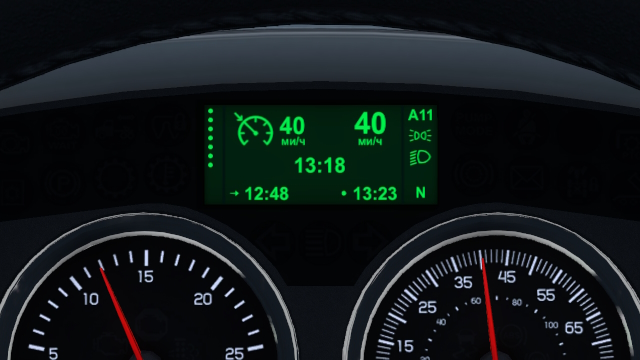
This mod improves Kenworth W900 Dashboard: - added current speed gauge; - added cruise control gauge; - added parking lights icon; - added low beam lights icon; - added remaining…

This mod replaces the stock Volvo VNL's dashboard computer with a more realistic version. Features: - Custom fonts for time and other displays - Odometer - Cruise Control…