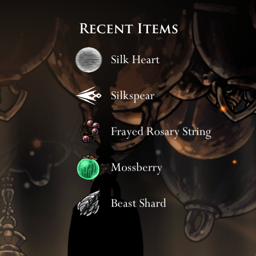
RecentItemsDisplay
Показать недавно полученные предметы в правом верхнем углу.


 Мод для Hollow Knight: Silksong
от flibber
Базовая утилита для создания внутриигровых интерфейсов.
CanvasUtil — мод для Hollow Knight: Silksong (Силксонг) от автора flibber. Базовая утилита для создания внутриигровых интерфейсов.
Его скачали 20,8 тыс. раз: это 54-е место среди модов Hollow Knight: Silksong в нашем каталоге, редкость — «редкий» (топ-50% по скачиваниям). Мод обновлялся в течение года, актуальная версия — 1.0.0.
Для работы ему нужны: BepInExPack Silksong.
Текст автора на языке оригинала
A utility for making in-game UIs in Hollow Knight: Silksong. This is a direct port of the CanvasUtil library from the Hollow Knight Modding API.
If you are not planning to resize panels, then this should be fairly straightforward to use. Typically you will start by creating a whole-screen canvas with something like
GameObject canvas = CanvasUtil.CanvasUtil.CreateCanvas(RenderMode.ScreenSpaceOverlay, new Vector2(1920, 1080));Note that CanvasUtil.CanvasUtil appears at the start with CanvasUtil repeated. You may want to put something like using CUtil = CanvasUtil.CanvasUtil; at the top of your file, so you can call CUtil.CreateCanvas.
If you have a canvas or panel GameObject parent and you want to add a child panel, then to construct the RectData to pass into the CreatePanel methods:
bottom left corner and (1, 1) is the top right.
as with the parent.
For example, to put a child in the bottom-right corner of the parent, you can set the anchor pivot, anchor min and anchor max to (1, 0) - this represents the bottom right corner (max x, min y). The anchor position should be (0, 0) to represent the fact that the anchor pivot (bottom right corner of parent) and anchor (bottom right corner of child) are the same point.
A utility added to help in mod development. Sometimes you want to know information that may change each frame, so logging is probably not the most helpful way to do it. CanvasUtil provides a utility called DebugPanel to help with this.
The easiest way to do this is to simply do the following:
// In your plugin class, define a function to get the text to display
private static string GetDebugPanelText()
{
    // Code goes here. This function will be called each frame
    // to figure out what the text to display should be.
}

// In your plugin Awake method
CanvasUtil.DebugPanel.Create(GetDebugPanelText);
An alternative approach can be as follows:
// In your plugin class, define a function to update the text and an event raised when updating the text
private static event System.Action? OnUpdateDebugPanelText;
internal static void UpdateDebugPanelText(string newText) => OnUpdateDebugPanelText?.Invoke(newText);

// In your plugin Awake method
var dp = CanvasUtil.DebugPanel.Create();
OnUpdateDebugPanelText += dp.SetText;

// Anywhere else in your mod
MyPlugin.UpdateDebugPanelText("the new text to display");
This is designed to be used while developing mods and is not expected to be used in published versions of mods. In both of the example codes, simply deleting the code from the "In your plugin Awake method" section will stop the debug panel from being created without breaking any other aspect of your mod.
В r2modman ставится автоматически
2 в каталоге
Показать недавно полученные предметы в правом верхнем углу.
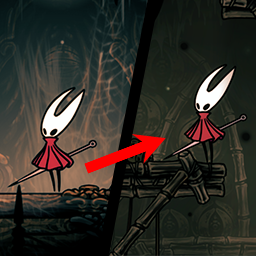
Мод, который телепортирует шершня в случайную комнату каждые x секунд
Файл скачивается с официального сервера Thunderstore, без перезаливов и сторонних установщиков
Подробная инструкция для Hollow Knight: SilksongВставьте значок в описание на Thunderstore, в README или в Discord — русскоязычные игроки сразу попадут на страницу с переводом и инструкцией.

[](https://modka.app/silksong/flibber-canvasutil/)<a href="https://modka.app/silksong/flibber-canvasutil/"><img src="https://modka.app/badge.png" alt="Описание на русском — Модка" height="44"></a>[url=https://modka.app/silksong/flibber-canvasutil/]Описание на русском — Модка[/url]Скачайте менеджер модов r2modman (или Gale) и выберите в нём игру Hollow Knight: Silksong. Создайте профиль — так моды не смешаются с чистой версией игры. Найдите «CanvasUtil» во вкладке Online и нажмите Download — BepInEx и все зависимости подтянутся сами. Нажмите «Start modded» — игра запустится с модами. Чтобы сыграть без модов, запустите игру как обычно из Steam — r2modman не трогает чистую версию игры.
Файл скачивается с официального сервера Thunderstore, куда его загрузил flibber. Мы не перезаливаем и не изменяем моды.
Установите вместе с ним: BepInExPack Silksong. В менеджере модов зависимости подтягиваются автоматически.
24 ноября 2025, актуальная версия — 1.0.0. Дата берётся с официальной страницы мода при каждом обновлении каталога.

Отображает вражеские бары здоровья и фактические номера повреждений игроков, с барами босса и настраиваемыми пользовательскими текстурами.

Главный инструмент практики для Silksong, с полнофункциональными сейв-состояниями, читами и многими другими функциями. Оригинальное название: Hollow Knight's DebugMod.

Мод, который позволяет вам снова сражаться с боссами и принимать вызовы босса, похожие на Godhome.

Мод, который позволяет вам управлять маленьким рыцарем в Silksong
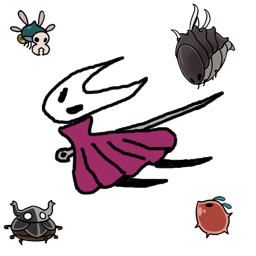
Враг Silksong и босс рандомизатор, созданный с помощью Architect, с вариантами семенной и несеменной рандомизации.

Компас стоит 0 и не нуждается в оборудовании для его использования. Настраиваемый.