


Advancement Plaques
Замените эти скучные всплывающие окна с чем-то более ярким.

 Мод для Minecraft
от Lythom
Принеси свою базу! Капсулы могут захватывать область, содержащую любые блоки или машины, а затем развертывать и разворачивать по желанию. Вдохновлен капсулами Dragon Ball.
Capsule — мод для Minecraft (Майнкрафт) от автора Lythom. Принеси свою базу! Капсулы могут захватывать область, содержащую любые блоки или машины, а затем развертывать и разворачивать по желанию. Вдохновлен капсулами Dragon Ball.
Его скачали 397,4 тыс. раз: это 1793-е место среди модов Minecraft в нашем каталоге, редкость — «обычный» (нижняя половина по скачиваниям). Мод обновлялся в последний месяц, актуальная версия — 1.21.1-9.1.248-fabric.
Для работы ему нужны: Forge Config API Port, Fabric API.
Работает на Fabric, Forge, NeoForge, поддерживает Minecraft до 1.21.1 включительно. По данным Modrinth, ставить его нужно так: на сервер и всем игрокам.
1 шт · нажмите, чтобы открыть
Текст автора на языке оригинала
Bring your base! Capsules can capture a region containing any blocks or machines, then deploy and undeploy at will. Inspired by Dragon Ball capsules.
Join us on Discord ! https://discord.gg/wZpBVdr
Detailed documentation on the wiki : https://github.com/Lythom/capsule/wiki
The first capsule you will have access to is made of wood. It's size is 1x1x1 which enables the "instant mode".
"Wooden capsule" recipe
It means you can capture any block (ie. a chest or a crafting table) by right clicking it, then deploy and undeploy it instantly by right clicking again with the capsule in hand.
If right click open a GUI, try to capture from a distance or while sneaking.
To get to the big things, you first need a capture base. This is where you can initialize a capsule with it's first content. You'll be able to capture the region on top of it.
"Capture Base" recipe
Then you need an empty capsule (the top item is a stone button) :
"Iron Empty Capsule" recipe, default capture size : 3x3x3 "Gold Empty Capsule" recipe, default capture size : 5x5x5 "Diamond Empty Capsule" recipe, default capture size : 7x7x7
Obsidian (9x9x9) and Emerald (11x11x11) capsules also exists, check JEI !
Empty Capsule
Throw it near the capture base !
Initial capture
Note that all the capsule can be dyed (affect the base color) and labeled (sneak + right click).
Linked capsule
Deploy / undeploy ## Rotations Linked capsules can be rotated and mirrored by players using left click / shift+left click while previewing deloyment. All vanilla blocks and non-living entities (minecarts,etc) are supported but modded blocks with specific behaviours (machines, etc.) will prevent a rotation by default to prevent messing with specific considerations with their orientation that capsule cannot know. The "canRotate" state might need to be updated when you first acquire a standard capsule (blueprints will always rotate), if rotation is locked and you think it should work, deploy and undeploy the capsule to update it and be able to rotate. If it still can't: there is a special block in the content that does not support rotation. As a modpack maker, if you want capsule to still try to rotate some specific modded block, you can whitelist them for blueprints and it will allow the block both to rotate in regular capsules and be used in blueprints. Checkout the \Blueprint whitelist section\.
**check the wiki at https://github.com/Lythom/capsule/wiki**
В r2modman ставится автоматически
Файл скачивается с официального сервера Modrinth, без перезаливов и сторонних установщиков
Подробная инструкция для MinecraftВставьте значок в описание на Modrinth, в README или в Discord — русскоязычные игроки сразу попадут на страницу с переводом и инструкцией.

[](https://modka.app/minecraft/capsule/)<a href="https://modka.app/minecraft/capsule/"><img src="https://modka.app/badge.png" alt="Описание на русском — Модка" height="44"></a>[url=https://modka.app/minecraft/capsule/]Описание на русском — Модка[/url]Установите загрузчик модов — Fabric, Forge или NeoForge — под вашу версию Minecraft (проще всего через лаунчер Modrinth App или Prism Launcher). Откройте страницу мода «Capsule» на Modrinth и скачайте файл .jar для своей версии игры и загрузчика. Положите .jar в папку .minecraft/mods (в Modrinth App — кнопка «Добавить контент» в профиле). Проверьте зависимости: многим модам нужен Fabric API или другие библиотеки. Запустите игру с выбранным профилем — мод появится в списке модов.
Файл скачивается с официального сервера Modrinth, куда его загрузил Lythom. Мы не перезаливаем и не изменяем моды.
По данным Modrinth — на сервер и всем игрокам. Если мод добавляет в игру новые блоки, предметы или мобов, он должен стоять и на сервере, и у игроков — одной и той же версии.
Установите вместе с ним: Forge Config API Port, Fabric API. В менеджере модов зависимости подтягиваются автоматически.
В каталоге есть файлы под версии от 1.12.2 до 1.21.1. Последняя поддерживаемая версия — 1.21.1. Файлы под конкретную версию и загрузчик — в таблице на этой странице.
10 ноября 2026, актуальная версия — 1.21.1-9.1.248-fabric. Дата берётся с официальной страницы мода при каждом обновлении каталога.
Замените эти скучные всплывающие окна с чем-то более ярким.
Мод камеры с акцентом на процесс и эстетику
Посмотрите на свои вещи, когда вы гребите на лодке!
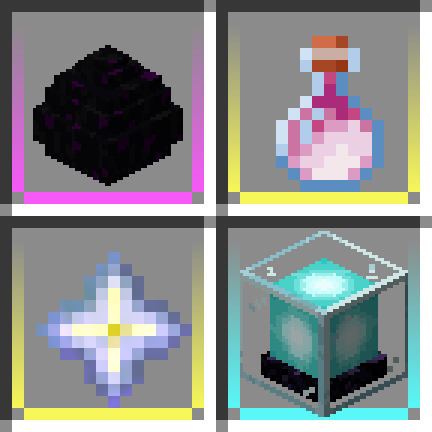
Добавьте цветные границы в слоты инвентаря, чтобы ваши редкие предметы выделялись!

Поддерживаемые объекты и предметы, такие как факелы, фонари или зачарованная передача, излучают свет! На стороне сервера!

Reacharound Placement / Bedrock Bridging for Fabric, Forge & Quilt с несколькими дополнительными настройками