

MorePlayers
Удалите лимит 4-х игроков в многопользовательских сеансах MIMESIS.

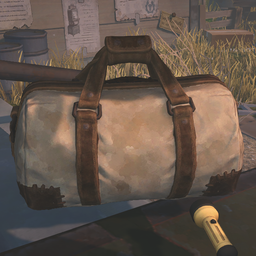
 Мод для MIMESIS
от DooDesch
Расширьте свой инвентарь дополнительными слотами для рюкзаков. Переключитесь между стандартным инвентарем и рюкзаком с настраиваемым ключом. Особенности анимированного пользовательского интерфейса, визуальные подсказки и автоматическая очистка при выходе из игры.
InventoryExpansion — мод для MIMESIS (Мимесис) от автора DooDesch. Расширьте свой инвентарь дополнительными слотами для рюкзаков. Переключитесь между стандартным инвентарем и рюкзаком с настраиваемым ключом. Особенности анимированного пользовательского интерфейса, визуальные подсказки и автоматическая очистка при выходе из игры.
Его скачали 40 тыс. раз: это 7-е место среди модов MIMESIS в нашем каталоге, редкость — «эпический» (топ-20% по скачиваниям). Мод обновлялся в последний месяц, актуальная версия — 1.5.1.
Для работы ему нужны: MelonLoader.
3 шт · нажмите, чтобы открыть
Текст автора на языке оригинала
🛟 Need help or found a bug? Get support at support.doodesch.de/inventoryexpansion.
Adds extra backpack slots beneath the inventory HUD. Press C to raise the hotbar and reveal them, using the game's own slot frames and key hint. Carry more loot without permanently cluttering the standard 4-slot hotbar. Standalone, no MimicAPI required.
C); the mod reads the key live each frame.BlockLargeItemsInBackpack.Open with loot - press C to raise the native inventory HUD and reveal the backpack underneath.
Room for more - choose any whole number from 4 to 24 extra slots. Rows stay centered and use at most eight slots each.
Component — Version
MIMESIS — 0.4.0
MelonLoader — 0.7.3+
Dependency: LavaGang-MelonLoader-0.7.3.
Install through a Thunderstore mod manager such as r2modman or Gale. The MelonLoader dependency is handled automatically.
InventoryExpansion.dll into MIMESIS/Mods/.UserData/MelonPreferences.cfg.Stored in UserData/MelonPreferences.cfg under [InventoryExpansion].
Gameplay settings follow the lobby host without overwriting saved client preferences. Without the mod on the host, clients use vanilla behavior. Live settings apply after the host changes them through a MelonPreferences UI or reloads the preferences; editing the file alone does not reload it. Use the same current mod version on host and clients for the new options and live updates. Older versions retain their initial legacy snapshot. Invalid new values use the registered default with a warning.
Enabled and AdditionalSlots are structural and apply to the next lobby. Movement, pickup and large-item rules are live. Input, selection and HUD animation stay local.
Option — Default — Range and effect
Enabled — true — Host master switch, next lobby.
AdditionalSlots — 4 — Host capacity, 4-24 whole slots, next lobby. Values outside the range are clamped on load. Native balanced rows use at most 8 columns.
ReduceMovementSpeed — true — Apply the movement multiplier while the backpack is fully open.
MovementSpeedMultiplier — 0.5 — Walking and running multiplier, 0-1. Zero stops movement, 1 keeps normal speed.
FillBackpackFirst — true — Prefer the open backpack for the host's own pickups.
BlockLargeItemsInBackpack — true — Restrict large items and opening while holding one.
BackpackKey — C — Local toggle key; use a Unity key name supported by the Input System. Invalid or empty values fall back to C.
SelectBackpackSlotOnOpen — true — Local selection handoff into the backpack.
RestoreStandardSlotOnClose — true — Local return to the previous standard slot.
AnimationSeconds — 0.25 — Local HUD animation, 0-2 seconds. Zero opens immediately.
C) to raise the inventory HUD and reveal the backpack underneath. Press it again to close the backpack and restore the original HUD height.Описание длинное — здесь его начало. Читать целиком на странице автора
В r2modman ставится автоматически
Файл скачивается с официального сервера Thunderstore, без перезаливов и сторонних установщиков
Подробная инструкция для MIMESISВставьте значок в описание на Thunderstore, в README или в Discord — русскоязычные игроки сразу попадут на страницу с переводом и инструкцией.

[](https://modka.app/mimesis/doodesch-inventoryexpansion/)<a href="https://modka.app/mimesis/doodesch-inventoryexpansion/"><img src="https://modka.app/badge.png" alt="Описание на русском — Модка" height="44"></a>[url=https://modka.app/mimesis/doodesch-inventoryexpansion/]Описание на русском — Модка[/url]Скачайте менеджер модов r2modman (или Gale) и выберите в нём игру MIMESIS. Создайте профиль — так моды не смешаются с чистой версией игры. Найдите «InventoryExpansion» во вкладке Online и нажмите Download — MelonLoader и все зависимости подтянутся сами. Нажмите «Start modded» — игра запустится с модами. Для мультиплеера всем игрокам нужен одинаковый набор модов: в r2modman профиль можно экспортировать кодом и отправить друзьям.
Файл скачивается с официального сервера Thunderstore, куда его загрузил DooDesch. Мы не перезаливаем и не изменяем моды.
Автор не указал, клиентский это мод или серверный. Безопаснее, чтобы одинаковый набор модов был у всех игроков в лобби: проще всего поделиться профилем r2modman.
Установите вместе с ним: MelonLoader. В менеджере модов зависимости подтягиваются автоматически.
1 ноября 2026, актуальная версия — 1.5.1. Дата берётся с официальной страницы мода при каждом обновлении каталога.
Удалите лимит 4-х игроков в многопользовательских сеансах MIMESIS.

Мод для MIMESIS, который предоставляет мини-карту.

Это делает прыжки в игре действительно полезными. Скачки по умолчанию в Mimesis практически бесполезны. Этот мод улучшает механику прыжков, чтобы вы могли эффективно перемещаться по картам.

Удалите фильтры голосового эффекта из микрофона, чтобы он звучал как реальный человек

Заставляет врагов подземелья сбрасывать добычу, которая соответствует нерестилищу текущей карты.
a mod menu.