UnlockEverything
Разблокирует весь контент в Megabonk - предметы, оружие, тома и персонажи

 Мод для Megabonk
от GuzTeam
Добавляет Гуз, играбельный персонаж, у которого есть пассивность каждого другого персонажа одновременно. Разблокирован с самого начала. Его побеги не попадают в таблицы лидеров, и ничего не написано для твоего спасения.
Guz — мод для Megabonk (Мегабонк) от автора GuzTeam. Добавляет Гуз, играбельный персонаж, у которого есть пассивность каждого другого персонажа одновременно. Разблокирован с самого начала. Его побеги не попадают в таблицы лидеров, и ничего не написано для твоего спасения.
Его скачали 655 раз: это 118-е место среди модов Megabonk в нашем каталоге, редкость — «обычный» (нижняя половина по скачиваниям). Мод обновлялся в последний месяц, актуальная версия — 1.3.0.
Для работы ему нужны: BepInExPack IL2CPP.
Текст автора на языке оригинала
A new playable character for Megabonk. Guz has the passive of every other character at the same time.
Gamba, RNG Blessing, Reinforced, Flex, Shadowstep, Enduring, Warrior, Hoarder, Stonks, Quantum XP Theory and Vampire. The 21st, Monke Grip (wall climbing), is off by default because it throws him off every steep slope; a setting turns it on.
Megachad (all of that can be changed in the settings).
with just that written on it), all free, in the skin row like any other character's.
Select Guz in the character select screen and click the GUZ SETUP button at the top of the screen.
ALL ON gives him all 21, DEFAULT all but Monke Grip. Healways keeps at least one.
Point at an entry to read what it does. Changes are saved and count from your next run. The button can be dragged somewhere else if it is in the way. The menu is mouse only; with a controller, use the settings below.
selection are kept in a small file next to the mod's settings.
Use a mod manager (Thunderstore Mod Manager, r2modman or Gale) and install this package; BepInEx comes with it.
Manual install: set up BepInExPack_IL2CPP for Megabonk, then copy the contents of this package into BepInEx\plugins\Guz\.
Start the game once, then edit BepInEx\config\mkaluzny.megabonk.guz.cfg (or use the mod manager's config editor). Changes apply the next time the game starts. The setup menu writes StartingWeapon, Exclude, Glide, Hover and WallClimb for you.
Section — Key — Default — Meaning
Character — Name — Guz — Display name
Character — Description — Text in the character select screen
Character — BaseCharacter — Megachad — Whose animations, sounds, base stats and weapon Guz borrows
Character — StartingWeapon — (empty) — Empty = the base character's weapon
Passives — Name — All of the Above — Name of the passive
Passives — ListNamesInDescription — false — List every passive in the description
Passives — Exclude — (empty) — Passives to leave out, e.g. Curse
Passives — MoveSpeedBonus — 30 — Percent of the passives' movement speed bonus Guz gets (Speed Demon builds up to +150%)
Passives — Glide — false — Float: hold jump in the air to glide down. The airborne damage bonus stays either way
Passives — Hover — false — Hoarder: hold jump to keep being lifted while moving upwards. The chest drops stay either way
Passives — WallClimb — false — Monke Grip: climb any wall or steep slope Guz runs into. Off = he does not get that passive at all
Menu — Enabled — true — Show the GUZ SETUP button in the character select screen
Menu — ButtonX / ButtonY — 0.5 / 0.012 — Where the button sits (0 to 1 across and down the screen); dragging it sets these
Appearance — Portrait — portrait.png — Portrait image; empty = the base character's
Appearance — Model / ModelTexture — guz.json / guz.png — Guz's mesh and texture; empty = the base character's
Appearance — ModelUnderHat — guz_hat.json — The mesh without the volume of his hair, shown while he wears a hat
Appearance — Tint / TintColor — false / #FFD24A — Tint the in-game model
With every movement passive at full strength Guz gets launched off steep slopes, which is why the speed bonus is turned down and glide, hover and wall climbing are off by default. Set MoveSpeedBonus = 100, Glide = true, Hover = true and WallClimb = true for the unfiltered experience.
character select screen until the mod is updated.
Exclude if that is more than you asked for.В r2modman ставится автоматически
Файл скачивается с официального сервера Thunderstore, без перезаливов и сторонних установщиков
Подробная инструкция для MegabonkВставьте значок в описание на Thunderstore, в README или в Discord — русскоязычные игроки сразу попадут на страницу с переводом и инструкцией.

[](https://modka.app/megabonk/guzteam-guz/)<a href="https://modka.app/megabonk/guzteam-guz/"><img src="https://modka.app/badge.png" alt="Описание на русском — Модка" height="44"></a>[url=https://modka.app/megabonk/guzteam-guz/]Описание на русском — Модка[/url]Скачайте менеджер модов r2modman (или Gale) и выберите в нём игру Megabonk. Создайте профиль — так моды не смешаются с чистой версией игры. Найдите «Guz» во вкладке Online и нажмите Download — BepInEx и все зависимости подтянутся сами. Нажмите «Start modded» — игра запустится с модами. Чтобы сыграть без модов, запустите игру как обычно из Steam — r2modman не трогает чистую версию игры.
Файл скачивается с официального сервера Thunderstore, куда его загрузил GuzTeam. Мы не перезаливаем и не изменяем моды.
Установите вместе с ним: BepInExPack IL2CPP. В менеджере модов зависимости подтягиваются автоматически.
19 октября 2026, актуальная версия — 1.3.0. Дата берётся с официальной страницы мода при каждом обновлении каталога.
Разблокирует весь контент в Megabonk - предметы, оружие, тома и персонажи

Бесшовный многопользовательский мод P2P для Megabonk с использованием Steamworks.
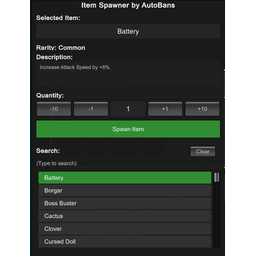
Спаунер предметов для Megabonk, позволяющий нереститься в любом предмете в игре, кроме оружия/домов.

Новый персонаж для MegaBonk, Cow-Noichi! Пользовательская статистика, анимация, оружие и модель.

Персонаж Megabonk я создал для себя просто для удовольствия.
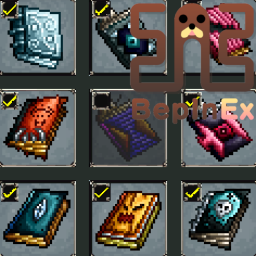
Порт BepInEx ToggleEverything компании Semibox. Вы можете переключать все разблокированное оружие, тома и предметы (требуется Toggler).