UnlockEverything
Разблокирует весь контент в Megabonk - предметы, оружие, тома и персонажи

 Мод для Megabonk
от Guibas
Играйте в Megabonk в роли Стива с геймплеем Minecraft: от первого лица, хотбар, 1,21 бой, Майнкрафт мобы, боссы, сундуки и оружие. Неофициальный мод фанатов.
Minebonk — мод для Megabonk (Мегабонк) от автора Guibas. Играйте в Megabonk в роли Стива с геймплеем Minecraft: от первого лица, хотбар, 1,21 бой, Майнкрафт мобы, боссы, сундуки и оружие. Неофициальный мод фанатов.
Его скачали 1,3 тыс. раз: это 107-е место среди модов Megabonk в нашем каталоге, редкость — «обычный» (нижняя половина по скачиваниям). Мод обновлялся в последний месяц, актуальная версия — 0.2.0.
Для работы ему нужны: BepInExPack IL2CPP.
Текст автора на языке оригинала
Minebonk is a mod that adds Steve as a playable character in Megabonk. The world and the enemies stay Megabonk; the gameplay becomes Minecraft's: first-person view, hotbar and inventory, the 1.21 combat rules, Minecraft mobs and bosses, chests with Minecraft loot, and weapons that are Minecraft items.
Not affiliated with Mojang, Microsoft or the makers of Megabonk. This is an unofficial fan mod. It contains no Minecraft files: textures and sounds are read from your own Minecraft install, or downloaded once from Mojang's servers if you accept the prompt (see below).
Some recent projects (for example universal-modder's Minecraft-in-GTA V demo) mix two games by running both at the same time and streaming camera, ground and events between them over a local connection. Minebonk does not do that. There is only one process: Megabonk. The Minecraft look and rules are rebuilt inside Megabonk itself (BepInEx + Harmony plugin): the Steve model, blocks, items, mobs, combat, HUD and sounds are all drawn and simulated by the mod in Megabonk's own engine. No Minecraft instance is launched, nothing runs in the background, and there is no extra latency or double memory use.
BepInExPack_IL2CPP pack on Thunderstore, or the build from builds.bepinex.dev) into your Megabonk folder and run the game once, so BepInEx creates its folders. (Tested with the Steam version of Megabonk.)BepInEx folder from this package into the Megabonk folder (it adds BepInEx/plugins/Minebonk/Minebonk.dll and NVorbis.dll).%APPDATA%\.minecraft), the mod uses it automatically. Tested with 26.2.BepInEx/config/MegabonkSteve_resources. Press F10 to open the prompt again. Restart the game after it finishes.Key — Action
Right click — Use item / block with shield / open chests and interact (the E key is disabled)
Left click — Attack (with anything; bare hands do 1 damage)
E — Inventory
F — Swap main hand and offhand
1–9, wheel — Hotbar
Ctrl / double W — Sprint
Shift — Slide / crouch
F5 — First / third person
F8 — Test panel (in game): spawn mobs and bosses, heal, kill all, full kit, sound volume
F9 — Skin picker (character screen and in game)
F10 — Download prompt for the Minecraft resources
F9 lists the skins saved in the Minecraft launcher, the nine default skins, and any 64x64 .png you put in BepInEx/config/MegabonkSteve_skins (end the file name with _slim for slim arms). The choice is remembered.
BepInEx/LogOutput.log. For more detail, create an empty file BepInEx/config/MegabonkSteve_debug.txt (this also enables the cheat keys L and K for levels).Описание длинное — здесь его начало. Читать целиком на странице автора
В r2modman ставится автоматически
Файл скачивается с официального сервера Thunderstore, без перезаливов и сторонних установщиков
Подробная инструкция для MegabonkВставьте значок в описание на Thunderstore, в README или в Discord — русскоязычные игроки сразу попадут на страницу с переводом и инструкцией.

[](https://modka.app/megabonk/guibas-minebonk/)<a href="https://modka.app/megabonk/guibas-minebonk/"><img src="https://modka.app/badge.png" alt="Описание на русском — Модка" height="44"></a>[url=https://modka.app/megabonk/guibas-minebonk/]Описание на русском — Модка[/url]Скачайте менеджер модов r2modman (или Gale) и выберите в нём игру Megabonk. Создайте профиль — так моды не смешаются с чистой версией игры. Найдите «Minebonk» во вкладке Online и нажмите Download — BepInEx и все зависимости подтянутся сами. Нажмите «Start modded» — игра запустится с модами. Чтобы сыграть без модов, запустите игру как обычно из Steam — r2modman не трогает чистую версию игры.
Файл скачивается с официального сервера Thunderstore, куда его загрузил Guibas. Мы не перезаливаем и не изменяем моды.
Установите вместе с ним: BepInExPack IL2CPP. В менеджере модов зависимости подтягиваются автоматически.
25 октября 2026, актуальная версия — 0.2.0. Дата берётся с официальной страницы мода при каждом обновлении каталога.
Разблокирует весь контент в Megabonk - предметы, оружие, тома и персонажи

Бесшовный многопользовательский мод P2P для Megabonk с использованием Steamworks.
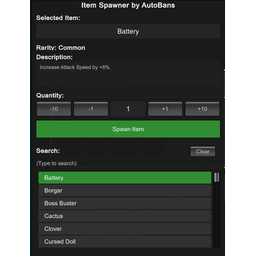
Спаунер предметов для Megabonk, позволяющий нереститься в любом предмете в игре, кроме оружия/домов.

Новый персонаж для MegaBonk, Cow-Noichi! Пользовательская статистика, анимация, оружие и модель.

Персонаж Megabonk я создал для себя просто для удовольствия.
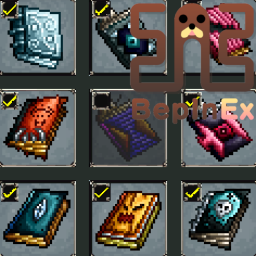
Порт BepInEx ToggleEverything компании Semibox. Вы можете переключать все разблокированное оружие, тома и предметы (требуется Toggler).