
SpectateEnemies
Позволяет наблюдать за врагами после смерти.

 Мод для Lethal Company
от Aavild
Новый терминал для смертельной компании
NewTerminal — мод для Lethal Company (Летал Компани) от автора Aavild. Новый терминал для смертельной компании
Его скачали 478 тыс. раз: это 361-е место среди модов Lethal Company в нашем каталоге, редкость — «обычный» (нижняя половина по скачиваниям). Мод давно не обновлялся — проверьте совместимость с текущей версией игры, актуальная версия — 1.4.0.
Для работы ему нужны: BepInExPack.
1 шт · нажмите, чтобы открыть
Текст автора на языке оригинала
Allows customising every single displayText on the terminal
warning: contains spoilers for creatures and log-messages
Download and follow the guide for BepInEx 5.4.22.
Download Release/BepInEx/plugins/NewTerminal.dll and put it into /Lethal Company/BepInEx/plugins.
Run LethalCompany and enter the spaceship once to generate the config files.
Modify the config file in /Lethal Company/BepInEx/config.
[TerminalMenus.Other] # <--- this is a category

# Setting type: String
# Default value: >MOONS\nTo see the list of moons the autopilot can route to.\n\n>STORE\nTo see the company store\'s selection of useful items.\n\n>BESTIARY\nTo see the list of wildlife on record.\n\n>STORAGE\nTo access objects placed into storage.\n\n>OTHER\nTo see the list of other commands\n\n[numberOfItemsOnRoute]\n
Help = >MOONS\nTo see the list of moons the autopilot can route to.\n\n>STORE\nTo see the company store\'s selection of useful items.\n\n>BESTIARY\nTo see the list of wildlife on record.\n\n>STORAGE\nTo access objects placed into storage.\n\n>OTHER\nTo see the list of other commands\n\n[numberOfItemsOnRoute]\n
can be modified into the following:
[TerminalMenus.Other]

# Setting type: String
# Default value: >MOONS\nTo see the list of moons the autopilot can route to.\n\n>STORE\nTo see the company store\'s selection of useful items.\n\n>BESTIARY\nTo see the list of wildlife on record.\n\n>STORAGE\nTo access objects placed into storage.\n\n>OTHER\nTo see the list of other commands\n\n[numberOfItemsOnRoute]\n
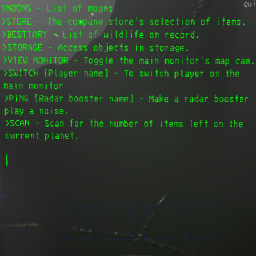
Help = >MOONS - List of moons\n>STORE - The company store\'s selection of items.\n>BESTIARY - List of wildlife on record.\n>STORAGE - Access objects in storage.\n>VIEW MONITOR - Toggle the main monitor\'s map cam.\n>SWITCH [Player name] - To switch player on the main monitor\n>PING [Radar booster name] - Make a radar booster play a noise.\n>SCAN - Scan for the number of items left on the current planet.\n\n
Note that TerminalMenus.Special is the terminal display when opening the terminal. If you want to modify the output of typing the help command you need to find it in NewTerminal-Other
It is also possible to rename commands. Example if you want to rename the buy command for pro flashlights buy pro -> c lu (spaces aren't used):
[TerminalMenus.Buy-cmd]

# Setting type: String
# Default value: buy
Buy-cmd = buy

# Setting type: String
# Default value: pro flashlight
ProFlashlight-cmd = pro flashlight
to:
[TerminalMenus.Buy-cmd]

# Setting type: String
# Default value: buy
Buy-cmd = c # <--- minimal 1 letter

# Setting type: String
# Default value: pro flashlight
ProFlashlight-cmd = lu <---- minimal 2 letters
Note that nouns are put in the category for their primary verb although renaming the command will also rename for other verbs.
With the example before this will also be renamed: info pro -> info lu
# are comments. Feel free to add/remove them as you see fit, although BepInEx might also create the default comments and remove new comments.
\n are newlines. You can temporarily make newlines for each \n and then delete the newlines when you're done editing an entry.
[totalCost] is an example where the game replaces a part of the text with a value.
The \n\n at the end of the text is to place the cursor at a new line. These are nice to have but not required.
Some letters need to be escaped by putting a \ before them such as \'.
if a value stops working just delete the entire entry. The plugin will automatically add it back the next time you enter a ship.
Each line is exactly 51 letters long.
In Notepad++ you can collapse categories to make navigation easier.
BepInEx.cfg's [Logging.Console] Enabled = true makes a console run in the background which displays a log, with errors and other log messages.
After closing LethalCompany, LethalCompany/BepInEx/LogOutput.txt contains a more concise log of errors/log messages with any plugins.
if you have other useful tips for other players feel free to create a Github issue on it.
Note that src/lib doesn't exist on purpose as the game DLLs are considered intellectual property.
Please find the needed DLLs on your own in your LethalCompany folder at \Lethal Company\Lethal Company_Data\Managed and insert them in a new src/lib folder.
In any IDE you should be able to build towards either Debug or Release which should target the appropriate folders specified in src/NewTerminal.csproj
Created under the Creative Commons License allowing anyone to copy the code and redistribute it without having to include the license.
В r2modman ставится автоматически
Файл скачивается с официального сервера Thunderstore, без перезаливов и сторонних установщиков
Подробная инструкция для Lethal CompanyВставьте значок в описание на Thunderstore, в README или в Discord — русскоязычные игроки сразу попадут на страницу с переводом и инструкцией.

[](https://modka.app/lethal-company/aavild-newterminal/)<a href="https://modka.app/lethal-company/aavild-newterminal/"><img src="https://modka.app/badge.png" alt="Описание на русском — Модка" height="44"></a>[url=https://modka.app/lethal-company/aavild-newterminal/]Описание на русском — Модка[/url]Скачайте менеджер модов r2modman (или Gale) и выберите в нём игру Lethal Company. Создайте профиль — так моды не смешаются с чистой версией игры. Найдите «NewTerminal» во вкладке Online и нажмите Download — BepInEx и все зависимости подтянутся сами. Нажмите «Start modded» — игра запустится с модами. Для мультиплеера всем игрокам нужен одинаковый набор модов: в r2modman профиль можно экспортировать кодом и отправить друзьям.
Файл скачивается с официального сервера Thunderstore, куда его загрузил Aavild. Мы не перезаливаем и не изменяем моды.
Автор не указал, клиентский это мод или серверный. Безопаснее, чтобы одинаковый набор модов был у всех игроков в лобби: проще всего поделиться профилем r2modman.
Установите вместе с ним: BepInExPack. В менеджере модов зависимости подтягиваются автоматически.
9 декабря 2023, актуальная версия — 1.4.0. Это больше года назад: перед установкой проверьте, работает ли мод на текущей версии игры.
Позволяет наблюдать за врагами после смерти.

Добавляет в магазин патроны для дробовика за 20 кредитов (настраивается).

Добавляет в магазин дробовики за 700 кредитов (настраивается).

Исправляет множество проблем с пропавшими звуковыми эффектами и со звуками, которые играют не вовремя.

Открытая реализация нагрудной и головной камеры, изображение которой выводится на правый нижний монитор в корабле. Картинка почти совпадает с реальным видом игрока, а производительность остаётся хорошей.

Добавляет в игру луну промежуточного уровня 10-EGypt.