OriginalModified
Added some initial decks.

 Мод для Inscryption
от SpecialAPI
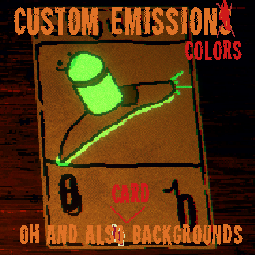
Adds new appearance behaviours to the game, mainly for JSONLoader users.
Configurable Emissions and Backgrounds — мод для Inscryption (Инскрипшн) от автора SpecialAPI. Adds new appearance behaviours to the game, mainly for JSONLoader users.
Его скачали 26,8 тыс. раз: это 39-е место среди модов Inscryption в нашем каталоге, редкость — «эпический» (топ-20% по скачиваниям). Мод давно не обновлялся — проверьте совместимость с текущей версией игры, актуальная версия — 1.0.0.
Для работы ему нужны: BepInExPack Inscryption, API.
Текст автора на языке оригинала
Adds new appearance behaviours to the game, mainly for JSONLoader users.
This mod adds 4 new appearance behaviours:
spapi.inscryption.configemissions.ConfigurableEmissionColor - changes the emission color to the one loaded from extended properties of the card using the prefix customEmissionColor.spapi.inscryption.configemissions.ConfigurableBackground - changes the card's background to the one loaded from a texture with the name stored in the extended property customBackgroundspapi.inscryption.configemissions.ConfigurableStatColors - changes the portrait color to the one loaded from extneded properties of the card using the prefix customPortraitColor, the attack color to the one loaded using the prefix customAttackColor, health to the one loaded using the prefix customHealthColor and name color to the one loaded using the prefix customNameColor.spapi.inscryption.configemissions.ExpandedPortrait - expands the card portrait to a full sized one. I'm not actually sure this works for jsonloader users (that depends on whether jsonloader automatically converts loaded images to textures or if it just gives api the path to them)This mod does NOT include a forced emission appearance. That is because, it already exists in the game and is called DefaultEmission (or if you want forced red emission you can use the basegame appearance RedEmission)
Well, that means that it tries to load the color using many different ways from the extended properties. The color load order is:
{prefix}HEX - firstly it tries to read the color in the HEX format from this extended property. HEX colors should be formatted like #RRGGBB where R, G and B are hex color components. Red color example: #FF0000.{prefix}255 - then if HEX isnt found, it tries to load it from a RGB 0-255 format from this extneded property. RGB 0-255 colors should be formateed like R,G,B where R, G and B are values ranging from 0 (black) to 255 (white). Red color example: 255,0,0{prefix}1 - if RGB 0-255 isnt found, it tries to load it from a RGB 0.0-1.0 format from this extended property. RGB 0.0-1.0 should be formatted like R,G,B where R, G and B are values ranging from 0.0 (black) and 1.0 (white). Red color example: 1.0,0.0,0.0{prefix}HSV - if RGB 0.0-1.0 isnt found, it tries to load it from a HSV format from this extended property. HSV should be formatted like H,S,V where H is a value ranging from 0 to 360 and S and V are values ranging from 0 to 100. Red color example: 0,100,100{prefix}HSV1 - if HSV isnt found, it tries to load it from a HSV 0.0-1.0 format from this extended property. HSV 0.0-1.0 should be formatted like H,S,V where H, S and V are values ranging from 0.0 to 1.0. Red color example: 0.0,1.0,1.0prefix - if the above methods fail, it tries to load the color from an extneded property with the name of only the prefix. It tries to load it from a HEX format, and if that fails it will try to load from an RGB 0-255 format. If that fails, it will default to no color.To use this, just add the appearances to the list of appearances (called appearanceBehaviour) by their names as listed in the appearance list. Then add their respective extended properties to the list of extended properties (called extensionProperties). Should look like this:
{
	"appearanceBehaviour": [
		add appearances here
	],
	"extensionProperties": [
		"add extension property names like this": "and their values like this"
	],
	other card info goes here
}To use this, just add the appearances to your card's list of appearances using yourcard.AddAppearances() and to load the appearance enums use GuidManager.GetEnumValue("spapi.inscryption.configemissions", "appearance's name without the guid, for example ConfigurableEmissionColor") Then add their respective extended properties to the list of extneded properties using yourcard.SetExtendedProperty("property name", "property value")
To use Configurable Emissions and Backgrounds, put ConfigurableEmissions.dll inside of your BepInEx plugins folder. It also probably works for Thunderstore Mod Manager or r2modman but I don't know for sure (I don't use them)
1.0.0 - release
В r2modman ставится автоматически
10 в каталоге · показаны самые популярные
Added some initial decks.

原神,启动!

Add some cards from the Death Temple in Part 2 to KCM, along with some original cards and imprints.

Added some cards based on myths, legends, and fictional elements.

Adds 80+ fans cards . A card pack for Act 1 and Kaycee's Mod.

[WIP] Leshy decided to steal a lot more than bones... Adds every act-2 and act-3 card to Kaycee's mod, complete with unique backgrounds and tribes for each temple.
Файл скачивается с официального сервера Thunderstore, без перезаливов и сторонних установщиков
Подробная инструкция для InscryptionВставьте значок в описание на Thunderstore, в README или в Discord — русскоязычные игроки сразу попадут на страницу с переводом и инструкцией.

[](https://modka.app/inscryption/specialapi-configurable-emissions-and-backgrounds/)<a href="https://modka.app/inscryption/specialapi-configurable-emissions-and-backgrounds/"><img src="https://modka.app/badge.png" alt="Описание на русском — Модка" height="44"></a>[url=https://modka.app/inscryption/specialapi-configurable-emissions-and-backgrounds/]Описание на русском — Модка[/url]Скачайте менеджер модов r2modman (или Gale) и выберите в нём игру Inscryption. Создайте профиль — так моды не смешаются с чистой версией игры. Найдите «Configurable Emissions and Backgrounds» во вкладке Online и нажмите Download — BepInEx и все зависимости подтянутся сами. Нажмите «Start modded» — игра запустится с модами. Чтобы сыграть без модов, запустите игру как обычно из Steam — r2modman не трогает чистую версию игры.
Файл скачивается с официального сервера Thunderstore, куда его загрузил SpecialAPI. Мы не перезаливаем и не изменяем моды.
Установите вместе с ним: BepInExPack Inscryption, API. В менеджере модов зависимости подтягиваются автоматически.
27 мая 2022, актуальная версия — 1.0.0. Это больше года назад: перед установкой проверьте, работает ли мод на текущей версии игры.

Brought to you by the lovely folks in the Saxby Family. Just for shits and giggles. Now with Over 100 Cards [Thanks for over 5000 downloads, Wow thats something, however this will be one of the last updates.]
A giant expansion for Act 1 that adds An entire Act themed after Five Nights at Freddys (Fnaf)!
Grimora Mod Revenant Card Pack. (P03 KCM Support)

The Mushroom Kingdom Expansion Pack comes with over 750 cards for your creative treks through Act 1 of Inscryption. (In progress of a rework) [Kaycee's Mod compatible]

Adds five new pelts to the trappers selection of pelts. Each based on Tribes in the game, more available with certain mods mentioned in the README. [RUN THE API ALONE ONCE BEFORE INSTALLING, this should be done so the config applies properly]
A mod that replaces all act 1/KCM card art. [100% finished]