

The More Content Pack
Этот модуль дает вам много хороших модов для большего количества веселого контента!

 Мод для Content Warning
от AnthonyStai
Позволяет играть на пользовательских саундбордах.
CustomSoundboards — мод для Content Warning (Контент Варнинг) от автора AnthonyStai. Позволяет играть на пользовательских саундбордах.
Его скачали 67,3 тыс. раз: это 106-е место среди модов Content Warning в нашем каталоге, редкость — «обычный» (нижняя половина по скачиваниям). Мод давно не обновлялся — проверьте совместимость с текущей версией игры, актуальная версия — 1.0.1.
Для работы ему нужны: BepInExPack.
1 шт · нажмите, чтобы открыть
Текст автора на языке оригинала
[![Forks][forks-shield]][forks-url] [![Issues][issues-shield]][issues-url] [![Stargazers][stars-shield]][stars-url] [![Thunderstore Downloads][thunderstore-shield]][thunderstore-url]
Custom Soundboards allow you to play audio.
https://example.com/audio1.mp3,https://example.com/audio2.mp3,...)Any issues please join the Content Warning Modding Discord server
Please open a issue on the GitHub repo here. I will respond to them as soon as possible.
If you would like to contribute please open a pull request.
Please make sure to update tests as appropriate.
[contributors-shield]: https://img.shields.io/github/contributors/ItzRock/CustomSoundboards.svg?style=for-the-badge [contributors-url]: https://github.com/ItzRock/CustomSoundboards/graphs/contributors [forks-shield]: https://img.shields.io/github/forks/ItzRock/CustomSoundboards.svg?style=for-the-badge [forks-url]: https://github.com/ItzRock/CustomSoundboards/network/members [stars-shield]: https://img.shields.io/github/stars/ItzRock/CustomSoundboards.svg?style=for-the-badge [stars-url]: https://github.com/ItzRock/CustomSoundboards/stargazers [issues-shield]: https://img.shields.io/github/issues/ItzRock/CustomSoundboards.svg?style=for-the-badge [issues-url]: https://github.com/ItzRock/CustomSoundboards/issues [license-shield]: https://img.shields.io/github/license/ItzRock/CustomSoundboards.svg?style=for-the-badge [license-url]: https://github.com/ItzRock/CustomSoundboards/blob/master/LICENSE.txt [thunderstore-shield]: https://img.shields.io/thunderstore/dt/AnthonyStai/CustomSoundboards?style=for-the-badge&logo=thunderstore [thunderstore-url]: https://thunderstore.io/c/content-warning/p/AnthonyStai/CustomSoundboards/
В r2modman ставится автоматически
2 в каталоге
Этот модуль дает вам много хороших модов для большего количества веселого контента!
Модпак, который делает ваш опыт CW лучше и смешнее! Emotes, Pushing Feature, Ragdoll, More Players, More Items & More...
Файл скачивается с официального сервера Thunderstore, без перезаливов и сторонних установщиков
Подробная инструкция для Content WarningВставьте значок в описание на Thunderstore, в README или в Discord — русскоязычные игроки сразу попадут на страницу с переводом и инструкцией.

[](https://modka.app/content-warning/anthonystai-customsoundboards/)<a href="https://modka.app/content-warning/anthonystai-customsoundboards/"><img src="https://modka.app/badge.png" alt="Описание на русском — Модка" height="44"></a>[url=https://modka.app/content-warning/anthonystai-customsoundboards/]Описание на русском — Модка[/url]Скачайте менеджер модов r2modman (или Gale) и выберите в нём игру Content Warning. Создайте профиль — так моды не смешаются с чистой версией игры. Найдите «CustomSoundboards» во вкладке Online и нажмите Download — BepInEx и все зависимости подтянутся сами. Нажмите «Start modded» — игра запустится с модами. Для мультиплеера всем игрокам нужен одинаковый набор модов: в r2modman профиль можно экспортировать кодом и отправить друзьям.
Файл скачивается с официального сервера Thunderstore, куда его загрузил AnthonyStai. Мы не перезаливаем и не изменяем моды.
Автор не указал, клиентский это мод или серверный. Безопаснее, чтобы одинаковый набор модов был у всех игроков в лобби: проще всего поделиться профилем r2modman.
Установите вместе с ним: BepInExPack. В менеджере модов зависимости подтягиваются автоматически.
5 апреля 2024, актуальная версия — 1.0.1. Это больше года назад: перед установкой проверьте, работает ли мод на текущей версии игры.

Vanilla + Modpack, который включает в себя все моды, которые вам могут понадобиться
Этот модуль дает вам много хороших модов для большего количества веселого контента!
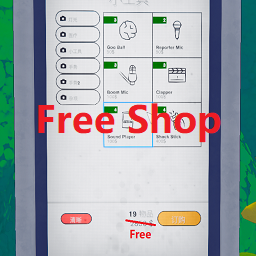
Позволяет покупать товары бесплатно.
Vanilla + Modpack, Это делает ваш опыт лучше! - Настроен и готов играть!

Делает игру настраиваемой! (Преемник ContentSettings!)

Восстанавливает потерянные кадры и копирует их на новую камеру, если ваша команда умерла или оставила свою камеру под землей. Включает настраиваемые награды, чтобы стимулировать успешное возвращение камеры!