Начните вводить название — например, MoreHead, Sodium или PEAK

Extended Diplomacy Ribbon — иконка
Обложка Civilization VIМод для Civilization VI

Extended Diplomacy Ribbon

от Aristos

UP TO DATE WITH APRIL 2021 "NOTHING" PATCH! COMPATIBLE WITH VANILLA, RISE & FALL AND GATHERING STORM ! WORKS IN MULTIPLAYER. Do you want to up your Diplomatic Game to the next…

  • Эпический
  • 695,3 тыс. подписок
  • Обновлён 9 мая 2021
  • Не обновлялся больше года
  • Интерфейс

О моде Extended Diplomacy Ribbon

Extended Diplomacy Ribbon — мод для Civilization VI (Цивилизацию 6) от автора Aristos. UP TO DATE WITH APRIL 2021 "NOTHING" PATCH! COMPATIBLE WITH VANILLA, RISE & FALL AND GATHERING STORM ! WORKS IN MULTIPLAYER. Do you want to up your Diplomatic Game to the next…

На него подписались 695,3 тыс. раз в Мастерской Steam: это 17-е место среди модов Civilization VI в нашем каталоге, редкость — «эпический» (топ-20% по подпискам). Мод давно не обновлялся — проверьте совместимость с текущей версией игры.

Нужны ли ему другие моды, видно на его странице в Мастерской Steam в блоке «Необходимые продукты» — при подписке Steam сам предложит их добавить.

Полное описание Extended Diplomacy Ribbon

Текст автора на языке оригинала

UP TO DATE WITH APRIL 2021 "NOTHING" PATCH!

COMPATIBLE WITH VANILLA, RISE & FALL AND GATHERING STORM !

WORKS IN MULTIPLAYER.

Do you want to up your Diplomatic Game to the next level without getting an Accountant degree? Would you like to see all relevant political information in one place for quick, optimal decisions, without diving into countless, different windows and subwindows? If you answered yes, then EDR is for you.

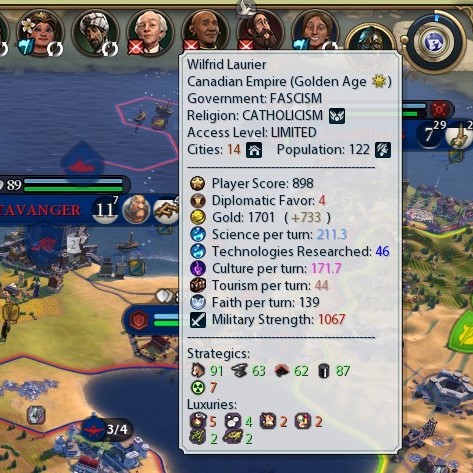
This mod extends the Diplomacy Ribbon to display all the relevant diplomatic information in one place. All the information displayed is available in-game in vanilla Civ6, but in different places of the UI and not readily at hand. EDR combines all that information into a simple, readable and always present combination of tooltips, mouse overs and clicks. It is an essential mod for the serious diplomat.

NEW ADDITION!! in Version 1.05B:

  • Be advised: these changes may affect compatibility with other mods that modify DiplomacyActionView.xml, such as Simplified Gossip. See Discussions for solution.
  • Added EDR to the DiplomacyActionView window! Disabled LEFT-Click and RIGHT-Click when inside this window to avoid breaking up the hierarchy of diplo calls. All other functions of EDR work inside the diplomacy window as usual. All functions, including Left and Right clicks, work normally when in the main game window, as usual.
  • Middle-Click on a Leader Icon works now as a toggle for the CTRL+MouseOver function: MIDDLE-Click on a Leader to enable CTRL+MouseOver function until MIDDLE-Clicking again! Useful for players than do not want to hold down CTRL while analysing Global Relations.

NEW!! in Version 1.05:

  • Added Trade Deals Information to the extended tooltips. Now, the player can see all ongoing trade deals and remaining duration right there on the diplo ribbon.
  • Only resources and gold deals on a per turn basis are shown, as those are the most relevant to keep an eye on from the diplomatic point of view. No need to clutter the tooltips with less needed information (i.e. agreements such as Open Borders, which are visually displayed on the map).
  • Added Intel Access level to the tooltips, right under Government information.
  • General re-org and cleaning of the code.

NEW!! in Version 1.04:

  • Added Unique Resource Indicator Icon inside Diplomacy Deal View to signal a Strategic or Luxury Resource that the Human player does not have (the NEW icon from the game UI).
  • Added Diplomatic Favor to the stats in the leader icon tooltips.
  • Added Grievances string whenever the player has grievances from or against the selected leader; the string will only appear, color coded, if there are grievances between player and selected leader.
  • Added Turn Expiration information for Friendships, Denouncements and Alliances (GS and R&F) to the Relationship Icon tooltip in the leader portrait.
  • Added Eras information to the tooltip (next to Empire name).
  • General compatibility assurance for all three versions of the game.

NEW!! in Version 1.03:

  • Added Trade Indicator Icon to signal that a civilization has a surplus of Strategic or Luxury Resources that the Human player does not have and can be traded.
  • Added tooltip to Trade Indicator detailing the surplus resources available to trade with the other civilizations.
  • Added Peace Indicator Icon to signal that a civilization at War with the Human player is willing to negotiate peace (cool down timer has expired).
  • Added color coding to the list of tradeable resources that other civilizations have: Bright Green amounts indicate resources that the Human player already posseses, and Bright Red signal resources that the Human does not have (if only 1, AI will not trade; this is considered for the Trade Indicator).

Main features:

  • Compatible with vanilla civ 6 and the Expansions: Rise and Fall, Gathering Storm
  • Does not affect save games nor Achievements: plug in or out at any time!
  • Non-cheat Policy: all information in EDR is available in-game in Civ 6
  • EDR uses Civ 6 extensibility feature, so that this mod does not touch any original game file, but extends the relevant one. By doing this, it should be resilient to patches

Origins: This mod is an enhancement of the original extensions I coded for CQUI. I do not like CQUI's banner hanging from the ribbon, so I decided to create a powerful, extensible and flexible tooltip instead. The Diplo Ribbon in this mod is considerably extended and better than the original I coded.

Extensions:

  • The Leader Icon tooltip displays the most relevant political, statistical and economical information for the corresponding civilization; the information is color coded, following the same color pallete as available in other parts of the UI.
  • The tooltip includes a summary of the tradable resources as shown inside the deal view for quick reference
  • The relationship icon shows the diplomatic modifiers, color coded, and the total value
  • With easy combinations of mouse and keys or button, the player can select any of the leaders and quickly see his/her relationship with other leaders
  • Right-click the leader icon to go straight to the deal view (or peace deal, if at war and the counter reached zero)

How to Use:

  • Mouse over any leader to display the extended tooltip at any time
  • Mouse over the relationship icon to see the diplomatic modifiers
  • Right-click a leader icon to go straight to the deal view window
  • If at war, and only after the peace counter expired, right-click the leader icon to go to the peace deal
  • Hold CTRL down and mouse over, or Middle Click, any leader icon to change relationship icons of the other leaders, to quickly see the relations of the selected leader; the golden circular indicator changes to the selected leader
  • If the selected leader has not met all civilizations yet, those unmet will display the default "unknown" icon and no relationship
  • To go back to the default display of the Diplo Ribbon (player leader selected), simply mouse over, middle click or r

Описание длинное — здесь его начало. Читать целиком на странице автора

Как установить Extended Diplomacy Ribbon

Мод ставится подпиской в Мастерской Steam — без архивов, перезаливов и сторонних установщиков

Подробная инструкция для Civilization VI
  1. Откройте страницу мода «Extended Diplomacy Ribbon» в Мастерской Steam (кнопка «Скачать» на нашем сайте ведёт именно туда) и нажмите «Подписаться» — Steam сам скачает мод и будет его обновлять.
  2. Если Steam покажет список обязательных модов, подпишитесь и на них — без них мод не заработает.
  3. Запустите Civilization VI, откройте «Дополнительный контент» → «Моды» и включите мод в списке.
  4. Если мод не появился в игре, откройте вкладку «Загрузки» в Steam и дождитесь, пока он скачается полностью, затем перезапустите игру.
  5. Для игры по сети подпишитесь на одни и те же моды всей компанией: набор модов у хоста и у игроков, как правило, должен совпадать.
Вы автор мода? Поставьте ссылку на русское описание

Вставьте значок в описание на Мастерская Steam, в README или в Discord — русскоязычные игроки сразу попадут на страницу с переводом и инструкцией.

Описание на русском — Модка
Markdown[![Описание на русском — Модка](https://modka.app/badge.png)](https://modka.app/civilization-6/extended-diplomacy-ribbon/)
HTML<a href="https://modka.app/civilization-6/extended-diplomacy-ribbon/"><img src="https://modka.app/badge.png" alt="Описание на русском — Модка" height="44"></a>
Steam (BBCode)[url=https://modka.app/civilization-6/extended-diplomacy-ribbon/]Описание на русском — Модка[/url]

Частые вопросы о Extended Diplomacy Ribbon

Как установить Extended Diplomacy Ribbon?

Откройте страницу мода «Extended Diplomacy Ribbon» в Мастерской Steam (кнопка «Скачать» на нашем сайте ведёт именно туда) и нажмите «Подписаться» — Steam сам скачает мод и будет его обновлять. Если Steam покажет список обязательных модов, подпишитесь и на них — без них мод не заработает. Запустите Civilization VI, откройте «Дополнительный контент» → «Моды» и включите мод в списке. Если мод не появился в игре, откройте вкладку «Загрузки» в Steam и дождитесь, пока он скачается полностью, затем перезапустите игру. Для игры по сети подпишитесь на одни и те же моды всей компанией: набор модов у хоста и у игроков, как правило, должен совпадать.

Безопасен ли Extended Diplomacy Ribbon?

Мы ничего не перезаливаем: кнопка скачивания открывает официальную страницу мода в Мастерской Steam. Там нужно нажать «Подписаться» — файлы загрузит и будет обновлять сам Steam.

Нужно ли друзьям ставить Extended Diplomacy Ribbon?

В сетевой игре Civilization VI набор модов у хоста и у остальных игроков, как правило, должен совпадать: подпишитесь на одни и те же моды всей компанией. Исключения — моды, которые меняют только то, что видите и слышите вы сами; точные требования автор пишет в описании мода.

Когда Extended Diplomacy Ribbon обновлялся последний раз?

9 мая 2021. Это больше года назад: перед установкой проверьте, работает ли мод на текущей версии игры.

Detailed Map Tacks — иконка

Detailed Map Tacks

Introduction Are you tired of calculating adjacency bonuses for your districts? This mod can help you plan the placement of your districts by calculating the potential yields and…

Легендарный2,8 млнГеймплей

Quick Deals — иконка

Quick Deals

Introduction Are you tired of asking each AI's price for your items to see who pays the most? This mod provides you an interface to see all AI's offers for the items you want to…
Легендарный2,6 млнИнтерфейс

Extended Policy Cards — иконка

Extended Policy Cards

UP TO DATE WITH APRIL 2021 "NOTHING" PATCH! COMPATIBLE WITH VANILLA, RISE & FALL AND GATHERING STORM ! WORKS IN MULTIPLAYER. REQUIRES BETTER REPORT SCREEN TO SHOW EFFECTS…

Легендарный2,5 млнИнтерфейс

Better Report Screen (UI) — иконка

Better Report Screen (UI)

New v7.0 as of 23.05 - Major technial redesign and several new features, improvements and fixes. Detailed information on the Change Notes tab. More information in the Report…

Легендарный2,1 млнИнтерфейс

Better Trade Screen — иконка

Better Trade Screen

Introduction The goal of this mod is to improve the trade screens in Civilization VI and help manage and monitor running trade routes. NOTE CQUI AND HBUI USERS: This mod is…
Легендарный1,5 млнИнтерфейс

Better Builder Charges Tracking — иконка

Better Builder Charges Tracking

This mod can help displaying Builder's current build charges on the side of unit flag for easier tracking, so you don't have to select each Builder to check.

Легендарный1,4 млнИнтерфейс